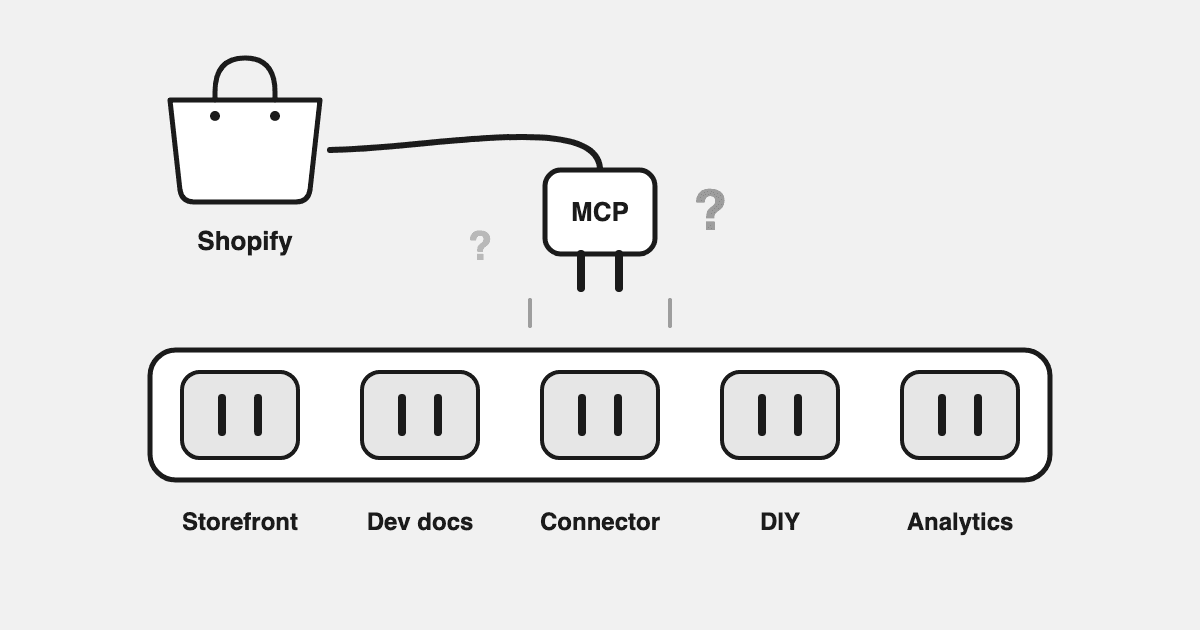
"Shopify MCP" is not one thing. It's at least five: a storefront endpoint your store already has, a docs server for developers, official AI connector apps, community Admin API servers, and hosted analytics MCPs. They do different jobs, and picking the wrong one is how you end up giving an AI write access to your store when all you wanted was answers.
TL;DR
- Every Shopify store now includes its own Storefront MCP endpoint — but it's built for shopping agents serving your customers (product search, carts, checkout), not for you analyzing your business.
- Shopify's official connector apps for Claude, ChatGPT, and Perplexity are built for store operations — and can take write actions like editing products and prices.
- Community Admin API servers (GitHub) are flexible but leave you managing tokens, scopes, and maintenance.
- For merchant analytics, a hosted read-only MCP like Datadrew's connects Claude to Shopify plus Meta, Google Ads, GA4, and Klaviyo — reconciled, with nothing able to change your store.
- Across stores connected to the Datadrew MCP, ShopifyQL queries are the single most-used tool — and about a third of all calls query ad platforms. Analytics questions rarely stop at Shopify data.
What Is a Shopify MCP, in 60 Seconds?
MCP (Model Context Protocol) is an open standard created by Anthropic, the company behind Claude. It lets an AI assistant query live data and use tools instead of guessing from training data or pasted CSVs.
A Shopify MCP server is any MCP endpoint that exposes Shopify data or actions to an AI: your products, orders, customers, analytics, or, depending on the server, the ability to change them. You add the server's URL in your AI tool's settings, approve access, and the assistant can answer from your real numbers.
"Shopify MCP" Means Five Different Things
This is where most guides confuse people. When someone says "Shopify MCP," they might mean any of these:
1. Storefront MCP, for your customers' AI agents
Since Shopify's Summer '25 Editions, every store includes its own Storefront MCP endpoint, no setup required. It lets AI agents search your catalog, manage carts, answer store FAQs, and start checkout.
Everything on that list serves your customers, not you. Storefront MCP exists so ChatGPT or Perplexity can shop your store on a buyer's behalf. It is not built to tell you what your MER did last week.
2. Shopify.dev MCP, for developers
Shopify also runs an MCP server for its developer docs and API schemas. If you build Shopify apps in Claude Code or Cursor, it's useful. It contains no data about your store.
3. Official AI connector apps, for store operations
Shopify ships official apps that connect your store to Claude, ChatGPT, and Perplexity. Once installed, the AI can browse orders, look up customers, manage products, create discounts, and pull store analytics.
Two things to know. They cover Shopify only: no ads, no GA4, no email data. And they can act on your store. Shopify's own help docs note that connected AI tools can take actions like updating products or changing prices, and that "Shopify doesn't review or approve actions that connected AI tools take on your behalf." Useful for operations, but treat the permissions seriously.
4. Community and DIY Admin API servers
GitHub hosts dozens of open-source Shopify MCP servers that wrap the Admin API, and directories list 50+. They're flexible, free, and yours to maintain: API tokens, scopes, upgrades, and whatever the AI does with the access you configured.
5. Hosted analytics MCPs, for merchant questions (Datadrew)
Built for the question the other four can't answer: how is my business actually doing? Datadrew's MCP at mcp.datadrew.io is one read-only, OAuth-secured connection that gives Claude your Shopify data plus Meta Ads, Google Ads, GA4, Klaviyo, Amazon, and 15+ sources. The data is reconciled overnight, and blended metrics like MER and cohort LTV are already defined.
| You want to… | Use | Access |
|---|---|---|
| Let AI agents shop your store for customers | Storefront MCP (built in) | Storefront, per-customer |
| Build Shopify apps with AI coding tools | Shopify.dev MCP | Docs only |
| Run store operations from Claude or ChatGPT | Official connector apps | Read + write to your store |
| Build something custom | Community/DIY Admin servers | Whatever scopes you grant |
| Analyze the business across store + ads + email | Datadrew MCP | Read-only, 15+ sources |
What Do Merchants Actually Use a Shopify MCP For?
We can answer this with data instead of guessing. Across 2,936 tool calls from stores connected to the Datadrew MCP (May–August 2026), ShopifyQL queries are the single most-used tool, ahead of every other data source. Merchants ask for morning numbers, sales-drop diagnoses, product winners, and cohort questions.
The second number matters more for your choice: about one in three calls queries an ad platform, and GA4 reports are close behind Shopify itself. Most real analytics questions need more than one source. "What's my blended ROAS this week?" needs Meta spend, Google spend, and real revenue in the same context. A Shopify-only MCP answers half the question.
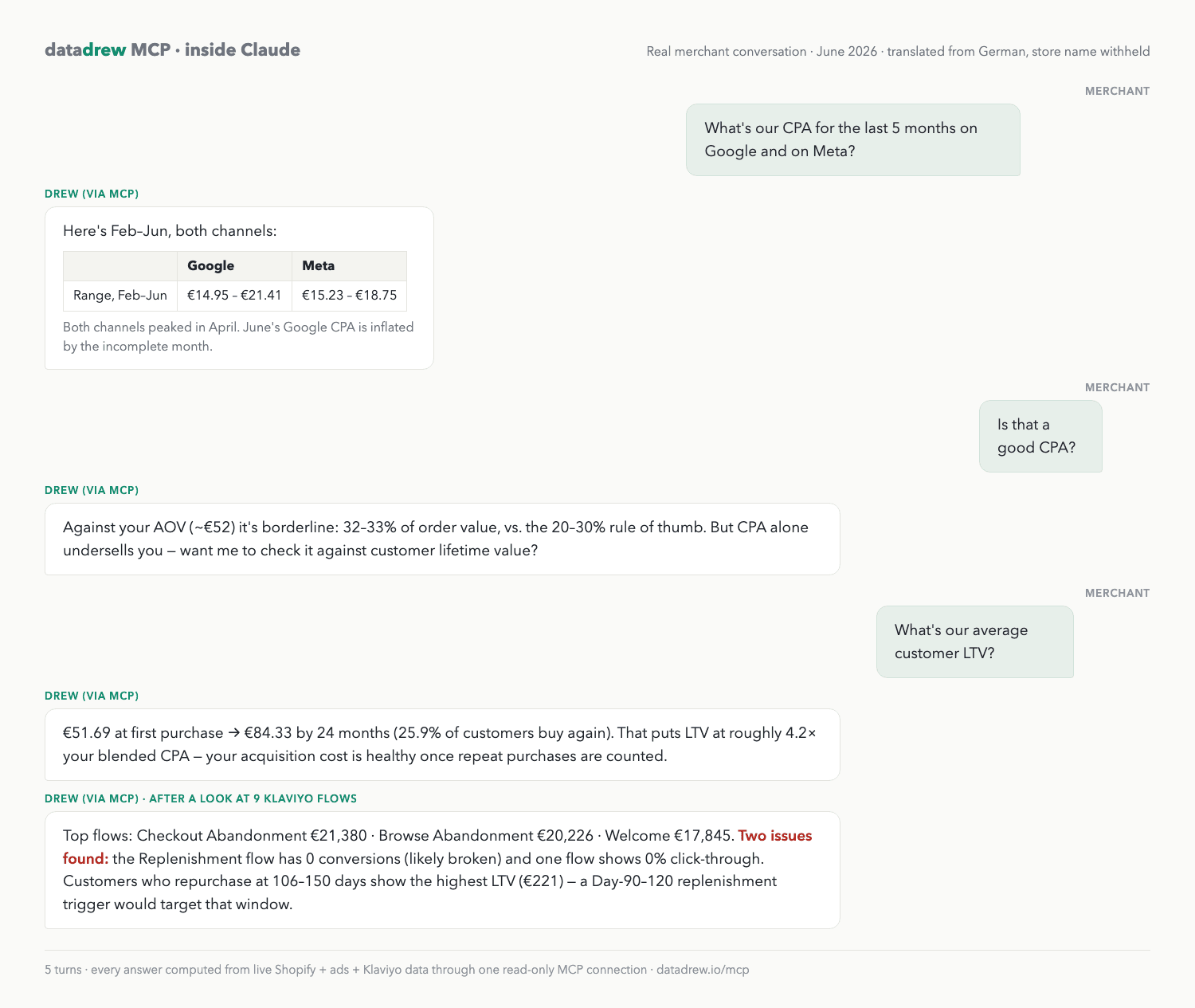
Is It Safe to Connect Your Store to an AI?
It depends on which kind of server you connect. The five options above split into two camps.
The operations camp (official connector apps, most Admin API servers) can change your store. Shopify handles this with staged permissions and confirmations at install, but monitoring what a connected tool does is on you.
The analytics camp should be read-only, and Datadrew's is. Claude can query every metric and cannot touch products, prices, orders, or campaigns, because the write path doesn't exist. Access is OAuth-secured, scoped to your workspace, and revocable in one click, with no API keys pasted anywhere.
The rule of thumb: match access to the job. If the job is analysis, read-only isn't a limitation, it's the correct permission.
How Do You Set Up the Analytics Option? (~2 Minutes)
- In Claude (claude.ai or Desktop): Settings → Connectors → Add custom connector.
- Paste
https://mcp.datadrew.io/mcp. - Approve the OAuth login. No API keys, no tokens to refresh, and you can revoke access anytime.
- Ask: "Can you access my Shopify data? Which store are you connected to?"
The same endpoint works in ChatGPT, Cursor, Windsurf, and Claude Code. Agencies can connect once and switch between client stores mid-conversation.
What Should You Ask First?
- "What did we make yesterday — revenue, orders, blended ad spend, MER?"
- "Why did revenue dip on Tuesday? Break it into traffic, conversion rate, and AOV."
- "Which products drove the most first-order revenue in the last 30 days, and which have the best repeat-purchase rates?"
- "Show my 90-day LTV by first product purchased."
- "Pull this week's Meta and Google spend next to store revenue. What's the blended ROAS?"
More in the prompt library on the MCP page.
FAQ
Does Shopify have an official MCP server?
Yes, several. Every store includes a Storefront MCP endpoint for AI shopping agents, Shopify.dev runs a docs MCP for developers, and official connector apps link your store to Claude, ChatGPT, and Perplexity for store operations.
What's the best MCP server for Shopify analytics?
For analyzing the business, not operating the store, use a read-only multi-source MCP. Datadrew's connects Claude to Shopify plus Meta, Google Ads, GA4, Klaviyo, and 15+ sources, with blended ROAS, MER, and cohort LTV already defined and reconciled to Shopify orders.
Is it safe to connect my Shopify store to Claude?
Match access to the job. Shopify's connector apps can take write actions on your store if granted. Datadrew's MCP is read-only by design: Claude can analyze your data but cannot change anything.
Can Claude change my store through the Datadrew MCP?
No. The MCP has no write access; it's analysis only.
Does a Shopify MCP work with Claude Code and Cursor?
Yes. Shopify's dev MCP is built for coding tools, and Datadrew's endpoint (mcp.datadrew.io/mcp) works in Claude Code, Cursor, Windsurf, ChatGPT, and any MCP-compatible client.
Can one MCP give Claude my Shopify and Meta Ads data together?
Yes, that's the point of a multi-source MCP. Datadrew serves Shopify, Meta, Google Ads, GA4, and Klaviyo through one connection, so blended questions get answered in one pass.
Connect your store's truth to Claude in one step: datadrew.io/mcp.