how to see competitor facebook ads
That's one of the searches in our founder research, word for word, and the answer takes a minute. Open Meta's Ad Library, pick the country you sell in and search the rival's Page. It's free, and every ad they have live in that country is sitting there.
The hour after that is where it goes wrong. If you run a Shopify brand doing $5M–$50M a year, you've done this scroll: 40 of a rival's ads at 11pm, a folder of screenshots, a Slack message that says some version of "they're doing a lot of UGC." Then nothing. No brief, no test, no decision.
Most guides stop at the minute, plus one rule of thumb: anything live 60 or 90 days is a winner. Nobody who repeats it shows data.
This piece covers that hour: what the Library proves and what it can't (from Meta's own documentation), how to read a two-month-old ad without fooling yourself, and a 30-minute Monday routine that ends in a brief. It's part of our creative performance hub.
Key Takeaways
- → To see competitor Facebook and Instagram ads, open Meta's Ad Library, pick the country you sell in and search their Page. It's free and shows every ad they have live.
- → The Library never shows spend, impressions or results for commercial ads, in any market. Ads delivered in the EU or UK add reach, targeting and a one-year archive.
- → 30+ days live means the ad survived the cull (about half don't reach day 28 in Motion's 2026 benchmarks), not that it's profitable. Corroborate with duplication, iteration and markets.
- → The output of a weekly check is a gap map and one to three new-concept briefs. Borrow the gap, never the ad.
How to see competitor Facebook ads in Meta's Ad Library
Six steps, nothing to install.
- → 1. Open the Library at facebook.com/ads/library.
- → 2. Pick the country you sell in. The Library shows ads delivered in the country you choose, and global brands often run a separate Page or different ads per market, so check each one.
- → 3. Keep the ad category on all ads.
- → 4. Type the brand and pick its Page from the suggestions. Skip the plain keyword search, which returns any ad that mentions the word.
- → 5. Filter by active status, platform, media type and date. Instagram, Messenger, Audience Network, Threads and WhatsApp ads all sit in the same Library (Meta's developer documentation lists each as a platform filter).
- → 6. Open each ad's details. The thumbnail is a teaser. The details are the evidence.
Each card shows the creative, the copy, the start date, the platforms and how many ads use the same creative and text. One entry can also hold several versions of its copy and headline (Meta's archived-ad field reference stores them as lists), so one card can hide a small test.
One trick worth the extra click: if the rival also sells in the EU, switch the country to one of their EU markets. Ads delivered there stay in the Library for a year after their last impression, so you see stopped ads too, which the US view won't reliably show.
What the Ad Library shows, and what it will never show you
The rules change at the EU and UK border. Everywhere else, the Library is a list of live ads with a start date. Ads that delivered an impression in the EU or UK carry more, but never the numbers you actually want.
| Data point | Ads delivered only outside the EU and UK | Ads delivered in the EU or UK |
|---|---|---|
| Live ads | Yes | Yes |
| Stopped ads | Not archived. Can disappear once paused | Kept for one year after the last impression |
| Dates | Start date only: the scheduled start, and pauses don't show | The dates the ad ran |
| Spend | Never | Never |
| Impressions | Never | Never |
| Results (purchases, ROAS, CTR, CPA) | Never | Never |
| Reach | No | Total reach, plus reach by country, age and gender |
| Targeting | No | The advertiser's age, gender and location selections |
| Who paid | No | Advertiser and payer (EU only; not shown in the UK) |
| Platforms and creative | Yes | Yes |
Source: Meta Business Help Center, About the Meta Ad Library, and Meta's Digital Services Act announcement of 22 August 2023. Checked 30 September 2026.
Spend and impression ranges exist in the Library only for social-issue, election and political ads, which Meta keeps for seven years. Some 2026 guides claim ranges for EU commercial ads too; Meta's own table says no. So any spend figure a tool shows for a rival's ad is an estimate.
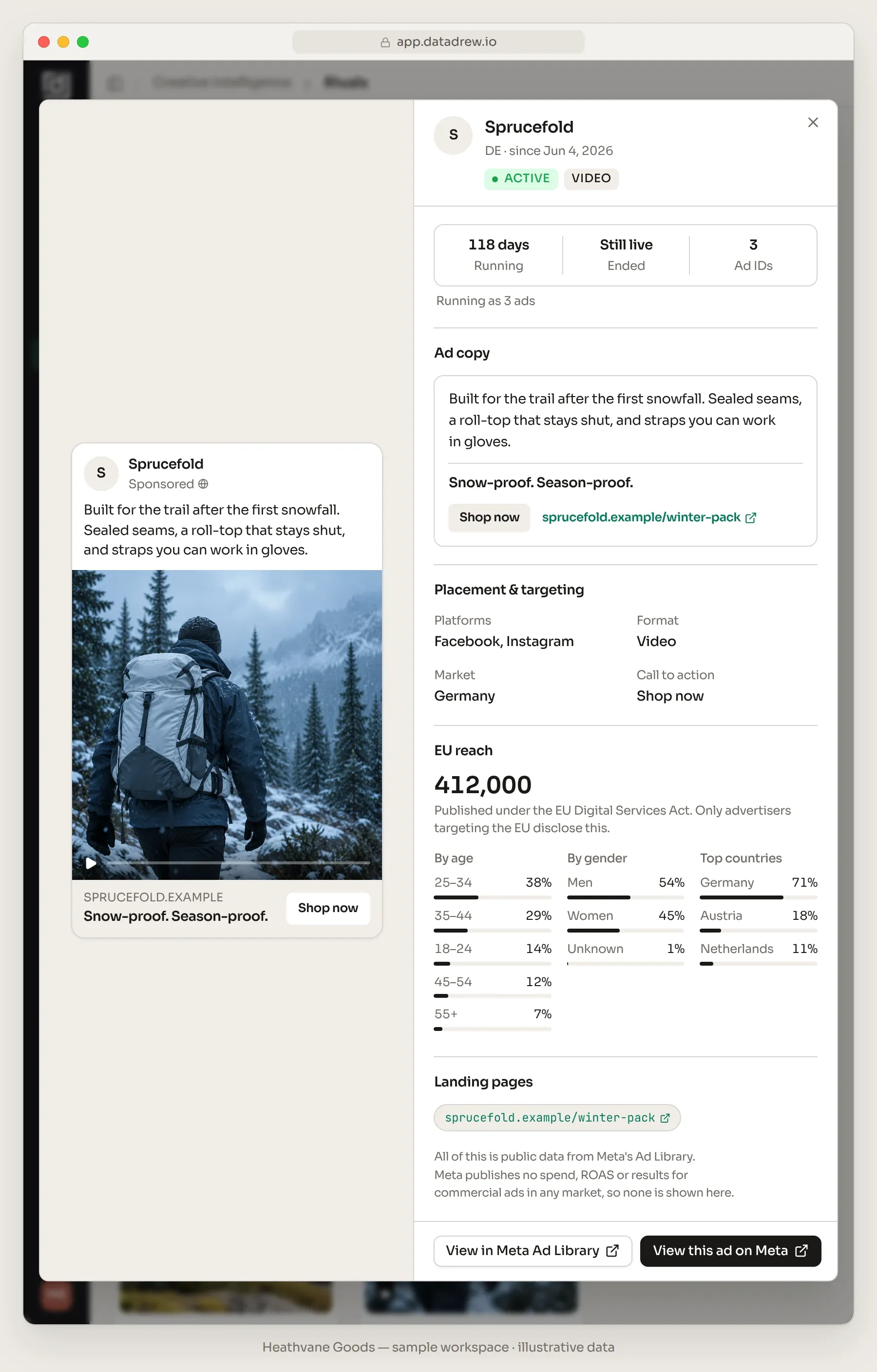
EU reach is good for two things: rough scale within one brand's ads, and who they reach. Take Sprucefold, one of three fictional rivals tracked by a sample account we use throughout (illustrative numbers). Its German video has reached 412,000 people in the EU: 38% aged 25–34, 54% men, 71% in Germany. Rank it against Sprucefold's other EU ads to see where their scale sits. Stop there. Reach counts people, CPMs differ by country, and none of it converts to money.
Does a long-running Facebook ad mean it's winning? What 30, 60 and 90 days really tell you
The pages that rank for this question say an ad live 60, 90 or 180 days is profitable. One scraper returns only ads live 60+ days, because nobody pays Meta for two months on a losing ad. It sounds airtight. None of them shows a number.
There is a number, and it's less flattering. Motion's Creative Benchmarks 2026 covers 578,750 creatives from 6,015 advertiser accounts and $1.29B of Meta spend (1 September 2025 to 1 January 2026). Its breakdown by spend tier sorts creatives into three buckets: off before 28 days, mid-range (28+ days of spend, not a winner) or winner (at least 10× the account median spend, plus a small dollar minimum). In every tier, about half are switched off before day 28.
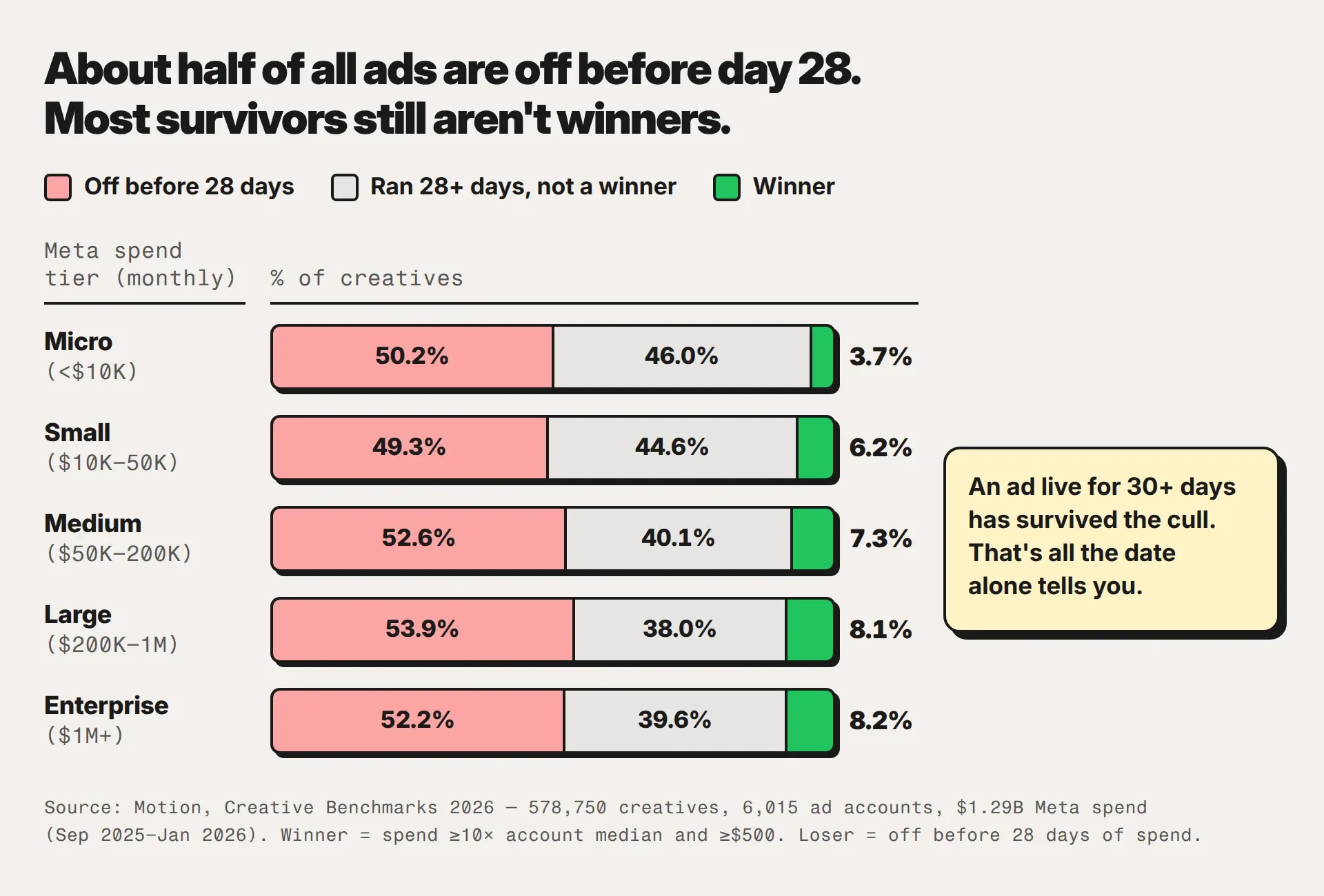
Now take the survivors. Among ads past day 28, the winner share is winners ÷ (winners + mid-range). At the Medium tier ($50K–$200K a month on Meta) that's 7.3 ÷ (7.3 + 40.1) ≈ 15%. At Large ($200K–$1M) it's 8.1 ÷ (8.1 + 38.0) ≈ 18%. Spend $60K–$800K a month and you sit in one of those two rows, where more than four in five of the ads that clear day 28 still aren't winners.
Two caveats. The arithmetic is ours and approximate, since it assumes Motion's winners also ran past day 28. And Motion's winner is a spend definition: getting budget says nothing about profit.
So 30+ days live means the ad survived the cull. That's all the date alone tells you.
Three ways longevity lies:
- → The date is the scheduled start. For ordinary commercial ads, Meta shows only a start date, which its developer documentation defines as when the advertiser wants delivery to begin. So a start date 64 days back means the ad was first scheduled then and is live today. Paused for three weeks in August, it would look exactly the same.
- → Containers outlive creatives. Dynamic creative and catalog ads keep one entry alive while the products and assets inside rotate, so a long date can't tell you which version did the work. On 20 July 2026, Markifact's Ahmed Ali pulled 40 active US ads, five each from AG1, Huel, HexClad, The Ridge, True Classic, Gymshark, Brooklinen and Magic Spoon. The median had been active 47 days, 18 at least 60 and 11 at least 90, and 27 of the 40 carried DCO or DPA format labels. Markifact's own read: runtime shows an advertiser kept an ad available, not what they spent or whether delivery was continuous.
- → Cheap ads linger. A retargeting ad on a small audience, or an evergreen offer, can sit live for months because it costs little and nobody got around to killing it. Set-and-forget is a strategy too. Just not one worth copying.
From the sample account: Loamwell, another fictional rival, has been running "Free shipping over $75 — this week only." for 41 days. Pauses or not, that's no flash sale. It's a standing offer wearing a deadline, so read our discount strategy for paid ads before you rush to match it.
Six signals that say more than the start date
No single signal settles it, so stack them. All six are public, and each has its own way of fooling you.
| Signal | Where you see it | What it suggests | How it misleads |
|---|---|---|---|
| Duplication | How many ads use the same creative | They trust it with budget in several ad sets | Some teams duplicate everything by habit, or run one ad per ad set. Compare with that brand's own norm. |
| Iteration | New hooks, creators or formats on the same idea | The concept survived testing and they're mining it | A batch launched on the same day is still a test. Check the start dates. |
| Persistence across markets | The same creative live in several countries (switch the country selector) | It traveled, so it's probably past the local-test stage | Global brands often run everything everywhere by default |
| Format spread | One message as static, video and carousel | The message is proven and they're buying placements | Dynamic formats spin out variants on their own. Set templated catalog ads aside. |
| Launch cadence | New ads in the last 7 days, and which ones vanished | Testing appetite. A burst before a date is a promo. | Outside the EU and UK, stopped ads can vanish, so you only know for sure what stopped if you logged it |
| EU/UK reach | Ad details, in EU and UK markets only | Rough scale within one brand's ads | Reach counts people. It can't be converted into spend. |
Then read the offer. Click through and note where each ad lands (product page, bundle, quiz, listicle) and which button it carries. Shop now into a product page is a straight conversion bet; Learn more into a quiz or listicle means they warm people up before asking for the sale. The button and landing page often say more about their funnel than the creative does.
Live 30+ days, running as many ads, iterated, and live in more than one market: that's as close to "working" as public data gets.
From scroll to brief: map their concepts against yours
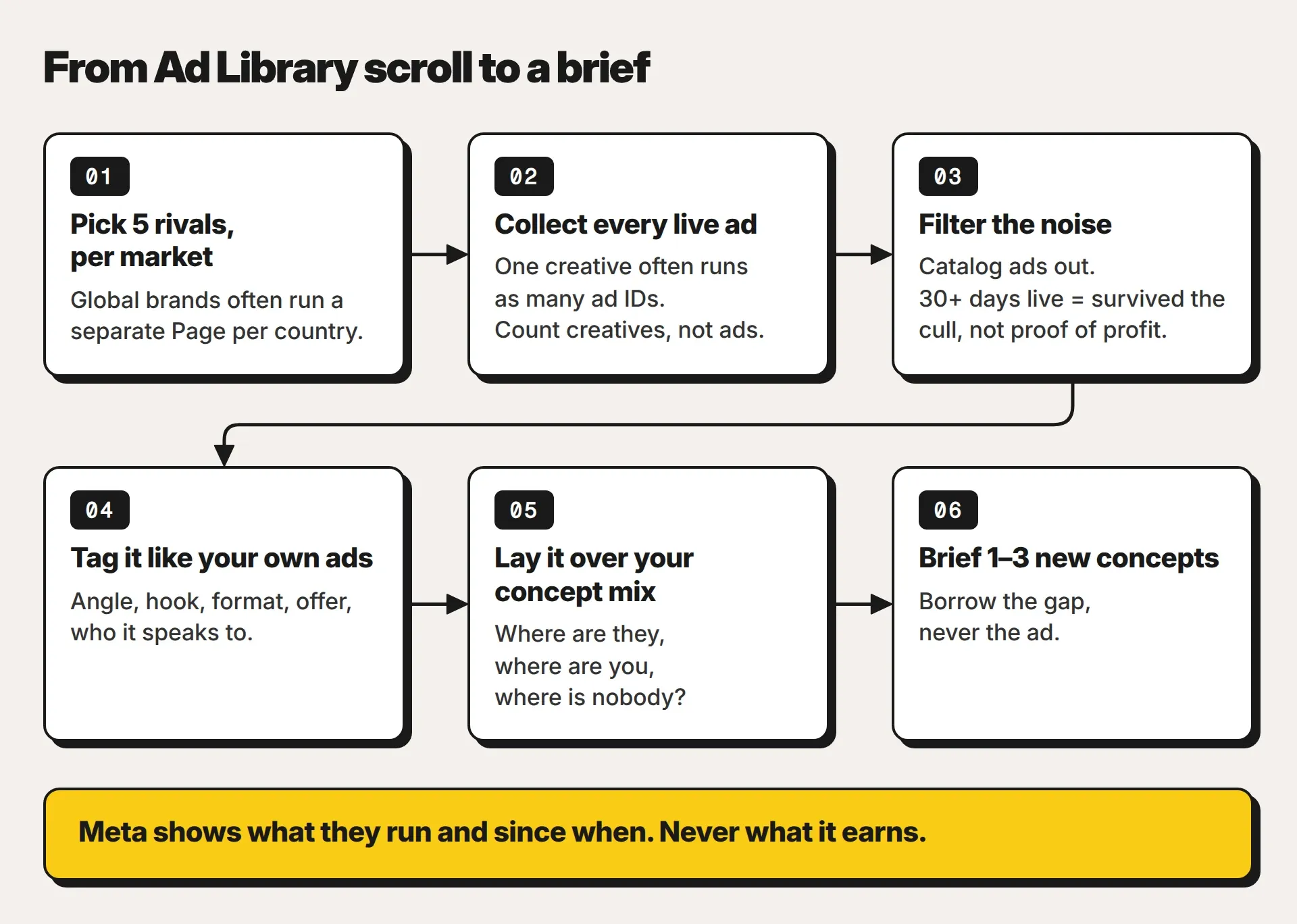
Everything above is reading. No ranking guide shows this part, and it's the only one that changes what you make next.
- → 1. Pick five rivals per market. Your US five and your German five are different lists.
- → 2. Collect every live ad, then count creatives. One creative often runs as many ad IDs, so a brand with 40 live ads may be running far fewer ideas.
- → 3. Filter the noise. Catalog ads out. Read 30+ days live as survived the cull, nothing more.
- → 4. Tag each ad the way you tag your own: angle, hook, format, offer and who it speaks to. Use the same labels as your creative table and your briefs, or the comparison falls apart. You can't see their hook rate, but you can judge their first three seconds against what lifts your own hook rate.
- → 5. Lay it over your concept mix. Where are they, where are you, where is nobody?
- → 6. Brief one to three new concepts.
Mirella Crespi, founder of Creative Milkshake, puts the goal plainly in a post on Motion's blog: "There is a method to the madness of actually looking through creatives, taking those learnings from your competitor's research, and then turning it into something that you can actually execute." Her read has six stages (concept, hook, script structure, visuals, pacing and congruency), and her team watches an ad six times, one stage per viewing. Save that for your best three. Tag the rest once and move on.
Worked example: the gap map for a daypack brand
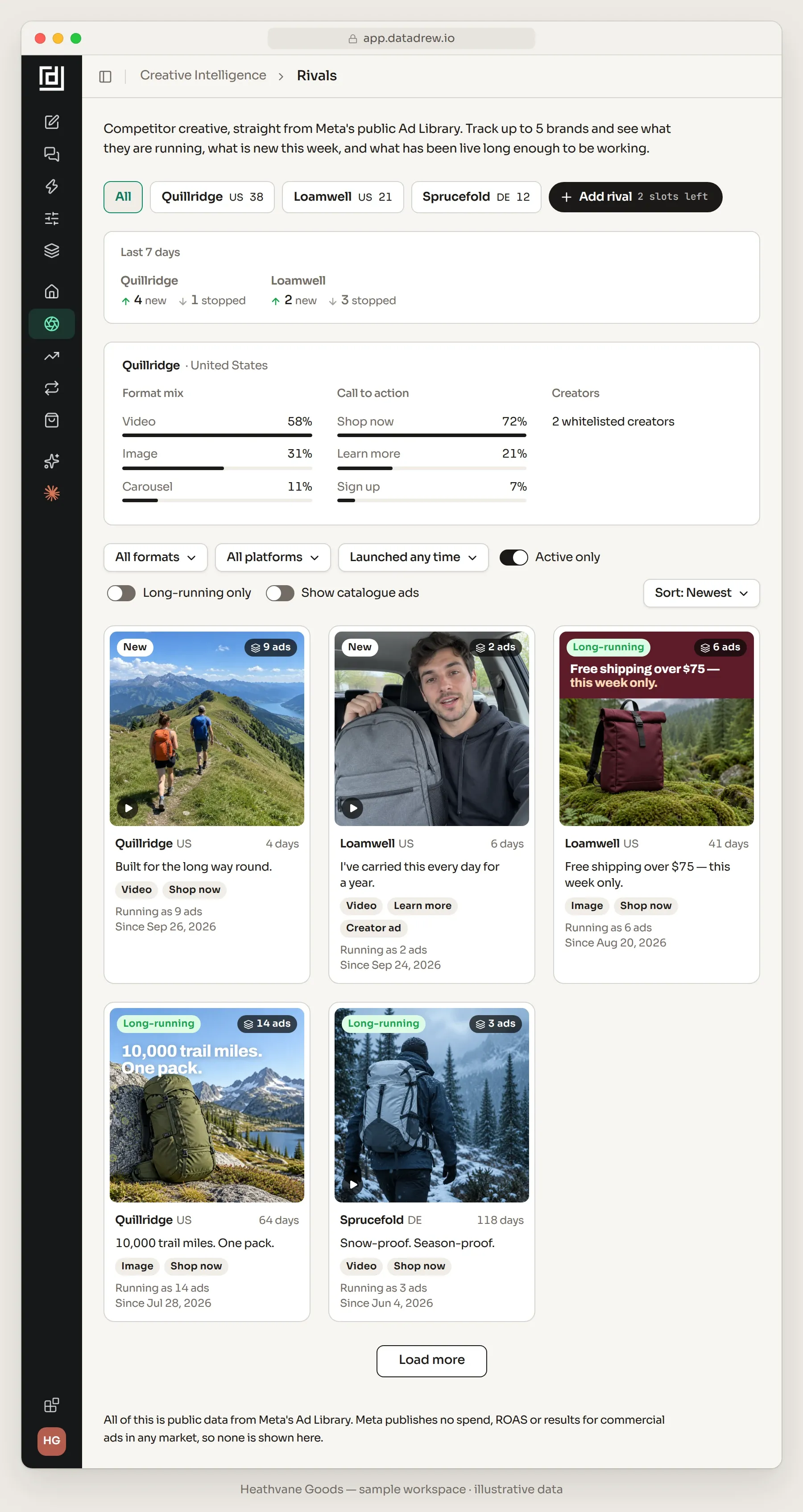
Back to the sample account. Heathvane Goods sells daypacks and slings on Shopify at about $18M GMV and spent $186,400 on Meta in the last 30 days. It tracks Quillridge and Loamwell in the US and Sprucefold in Germany, all three fictional. Five of their live ads, tagged:
- → Quillridge, "10,000 trail miles. One pack." Static, 64 days, running as 14 ads. Tag: durability.
- → Quillridge, "Built for the long way round." Video, 4 days old, already running as 9 ads. Tag: durability.
- → Loamwell, "Free shipping over $75 — this week only." Static, 41 days, running as 6 ads. Tag: offer.
- → Loamwell, creator video, "I've carried this every day for a year." New (6 days), running as 2 ads, Learn more button. Tags: durability, creator testimonial.
- → Sprucefold, "Snow-proof. Season-proof." Video, 118 days in Germany, running as 3 ads. Tag: weather-proofing.
Heathvane's own concept mix over the same 30 days (Meta-reported): Social proof takes 25% of spend at 4.5× ROAS, Offer 18% at 3.4×, Bold claim 17% at 1.6×, Demonstration 14% at 3.4×, Founder story 12% at 2.7× and Us vs them 7% at 2.4×. The last 7% isn't grouped into a concept yet. Now lay one over the other.
| Message | Rival ads carrying it (of the five) | Heathvane's spend on it | The read |
|---|---|---|---|
| Durability (it lasts for years and miles) | 3: both Quillridge ads and Loamwell's creator video | None. No concept leads with it; the lifetime-repair promise shows up only as a supporting claim in the unboxing video | The gap. Brief a new concept. |
| Weather-proofing | 1: Sprucefold, 118 days in Germany | 17% (Bold claim: the Waterproof and Desert statics) at 1.6×, the weakest concept | Covered, and tiring. Fix yours first (fatigue at the concept level), then think about adding more. |
| Offer (theirs: free shipping over $75) | 1: Loamwell, 41 days | 18% (Offer, led by the Peak Bundle static: save $40) at 3.4× | Covered, with a different offer. Their "this week only" has run for nearly six weeks, so don't panic-match it. |
| Creator testimonial | 1: Loamwell's new video | 25% (Social proof) at 4.5×, your best concept | Covered. Watch whether theirs gets duplicated next week. |
One row matters. Durability carries three of the five rival ads, and nothing Heathvane runs leads with it. So the brief is one new concept, Durability, proven: the lifetime-repair promise shown on a three-year-old, scuffed pack, told by a customer. That puts Heathvane's strongest format (a customer on camera, the 4.5× concept) behind a message it now leaves to a supporting line.
Borrow the gap, never the ad. No "10,000 trail miles" line, no copied hook, nothing a customer could mistake for Quillridge. Write it with the brief template, then test it as a new concept rather than a hook swap on an ad you already run.
A 30-minute weekly routine for tracking competitor ads
Monday, 30 minutes, five rivals per market you sell in. For each rival, check:
- → What launched in the last 7 days.
- → What stopped since last Monday.
- → Which new ads are already running as many ads. A four-day-old creative running as 9 ads is the one to watch.
- → Which long-runners are still live.
- → Any change to the offer: shipping threshold, bundle, discount.
- → Save the media of anything you'd tag. US-only ads can vanish once they stop, links and all.
Log one line per creative, in the same sheet every week: date seen, brand, market, link and screenshot, message, hook, format, offer, CTA and landing page, start date, ads it's running as, and whether it's still live. Boring, yes. It's also your only record of what stopped once the Library forgets it.
Monthly, on the first Monday, take an hour: re-tag the long-runners, redo the gap map and pick one to three briefs. Quarterly, re-pick the five: the brand your customers compare you with in reviews and post-purchase surveys, the one taking share in paid social, one from an adjacent category, one bigger brand you aspire to, and one newcomer.
Ignore catalog ads, anything younger than a week unless it's already duplicated heavily, promos pinned to a date, and ads in markets you don't sell in.
A monthly-only check shows you survivors. Weekly shows you their tests.
What competitor ads can't tell you
- → Their spend, ROAS, CPA or profit. Never, in any market.
- → Who they target, outside the EU and UK.
- → The tests you never saw. About half of ads are off before day 28, and outside the EU and UK the dead ones can vanish.
- → Their business: margins, stock, returns, repeat rate, and the email list and brand search an ad may be riding on.
- → Whether it would work for you. Your price, offer, audience and brand are different.
Copy their angle with their hook and you arrive second, with a weaker version of their brand. A borrowed concept is a hypothesis for your test lane, graded on your own numbers. Whether it sells shows up in your Shopify orders, at the account and product level. The hub draws that line in what creative data can and can't tell you, next to the rest of the creative method for Shopify brands.
How Drew fits. Rivals, in Datadrew's Creative Intelligence section, does this routine's collection step from Meta's public Ad Library. Track competitor brands per market: one on the free plan, up to five on paid plans. Each creative shows once, with how many ads it's running as, beside what launched and stopped in the last 7 days, the format, call-to-action and creator mix, and EU reach where Meta publishes it. The 30+ day long-running badge is labeled a proxy, not a performance metric, and catalog ads stay hidden until you ask. Brands you've viewed in the past week refresh daily, the rest weekly; a new rival is collected within a day.
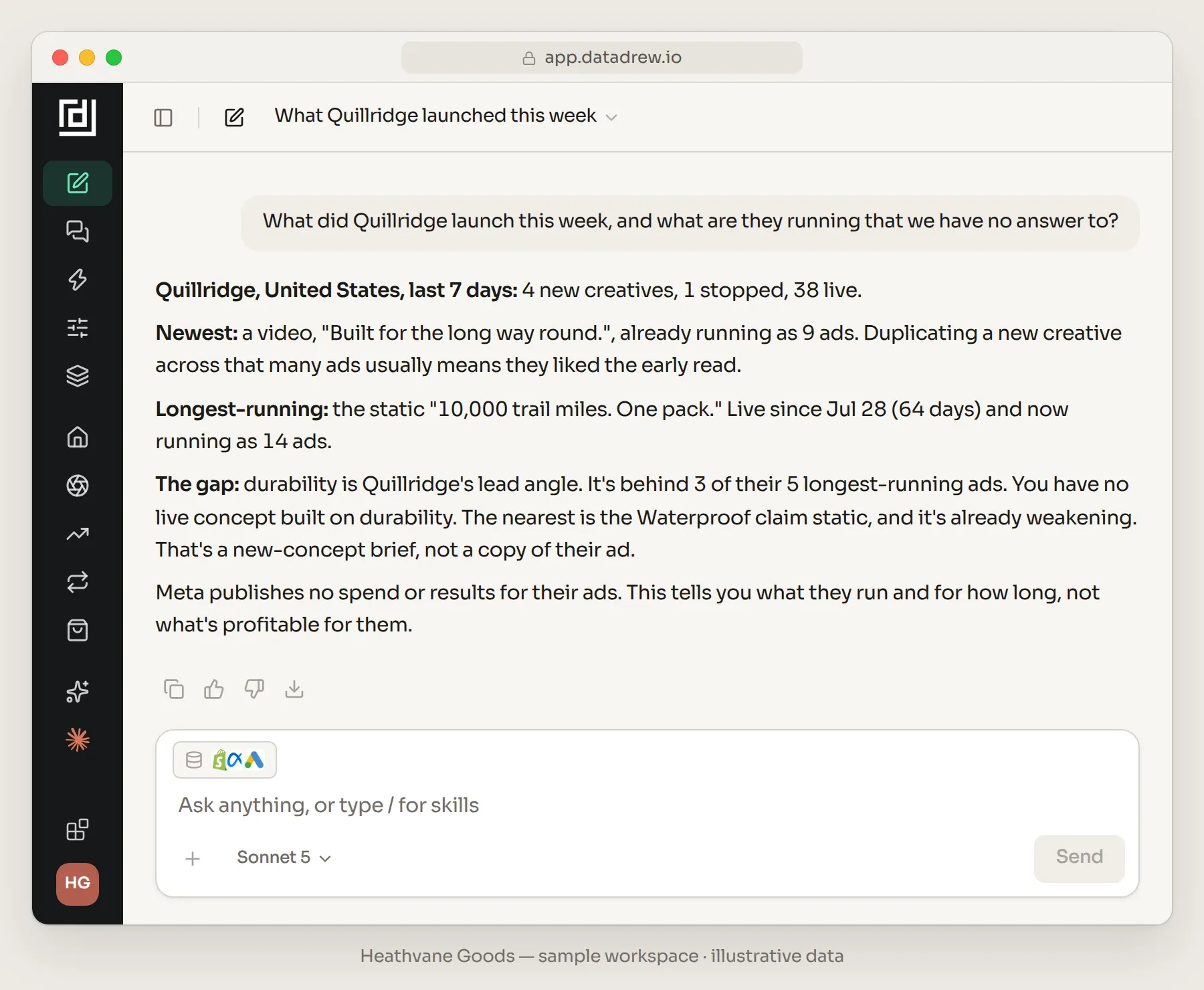
Competitor Watch, a Drew report, emails your rivals' launches and stops every Monday at 9am by default; you can edit the day, channel and prompt, and runs use Drew AI credits. Or ask Drew, "What did Quillridge launch this week, and what are they running that we have no answer to?", and it reads their live ads next to your creatives and concepts. It won't show or estimate spend or results for anyone (Meta publishes none), tag rival ads against your concepts unprompted, or make the ad. Drew writes briefs as text. More on how Rivals works and free versus paid plans.
Key Takeaway
To see competitor Facebook ads, open Meta's Ad Library, choose the country you sell in and search the brand's Page; Instagram ads are there too. The Library never shows spend, impressions or results for commercial ads in any market; EU and UK delivery adds reach, targeting and a year of history. An ad live 30+ days has only survived the cull (about half of all ads are off before day 28 in Motion's 2026 benchmarks), so corroborate with duplication, iteration and persistence across markets. A weekly check should end in a gap map and one to three new-concept briefs. Borrow the gap, never the ad.
Frequently Asked Questions
How do I see a competitor's Facebook and Instagram ads?
Go to Meta's Ad Library at facebook.com/ads/library, choose the country you sell in, keep the category on all ads, and pick the brand's Page from the search suggestions. Instagram ads sit in the same Library and can be filtered by platform, as can Messenger, Audience Network, Threads and WhatsApp. Check each market you sell in, because global brands often run a separate Page or different ads per country.
Can you see how much a competitor spends on Facebook ads?
No. Meta publishes no spend, impressions or results for commercial ads in any market, the EU and UK included. Spend and impression ranges exist only for social-issue, election and political ads. Any tool that shows a spend figure for a rival's commercial ad is estimating it.
Does a long-running Facebook ad mean it's profitable?
No, it means the ad survived. In Motion's 2026 benchmarks about half of all ads are off before day 28, and at the Medium and Large spend tiers ($50K–$1M a month on Meta) more than four in five survivors still aren't winners, on a definition that measures spend rather than profit. The start date is also the scheduled start, so pauses don't show, and catalog ads keep one entry alive while products rotate. Corroborate with duplication, iteration and persistence across markets.
Why can't I find a competitor's old or paused ads in the Ad Library?
Outside the EU and UK, Meta only guarantees active commercial ads; paused ads can disappear. Ads that delivered an impression in the EU or UK stay for one year after their last impression, so switching the country to an EU market the brand sells in shows more of its history. An ad that was rejected or disabled after running shows up covered by a shield.
What does the EU (DSA) data show about a competitor's ads?
For ads delivered in the EU, the Library shows total reach, reach by country, age and gender, the advertiser's age, gender and location targeting, and who the advertiser and payer are, and it keeps each ad for a year after its last impression. UK-delivered ads get the same archive, reach and targeting data, without the advertiser and payer details. Neither shows spend or impressions. Meta announced the EU changes in August 2023, as the Digital Services Act came into effect.
How many competitors should I track, and how often?
Five per market you sell in, checked weekly in about 30 minutes, plus an hour on the first Monday of each month to re-tag long-runners, redo the gap map and pick one to three briefs. Re-pick the five every quarter. Weekly matters because a monthly check only ever shows you the survivors.
Written by Sumit Bansal, co-founder of Datadrew. Published 30 September 2026. Meta Ad Library facts checked against Meta's Help Center and developer documentation on 30 September 2026. The competitor brands in the worked example are fictional, and the numbers are a sample account with illustrative data. Meta publishes no spend or results for commercial ads, and nothing here estimates them.